When you’re browsing events on ME-Ticket, it’s easy to come across concerts, festivals, and shows you want to attend but may not be ready to purchase yet. That’s where the Wishlist feature becomes your personal event assistant. Designed to help you bookmark, organize, and revisit events anytime, the Wishlist ensures you never lose track of experiences you’re interested in.
Whether you’re exploring upcoming concerts, comparing event options, or planning nights out with friends, the Wishlist gives you a clean and convenient way to save your favorites.

What Is the Wishlist on ME-Ticket?
The Wishlist is a personal collection of events you choose to save while browsing the ME-Ticket platform. It acts like a reminder list: instead of buying tickets immediately, you can store interesting events and come back to them later.
In the interface (both desktop and mobile), you will find:
- A Wishlist section in the left menu (desktop) or main menu (mobile).
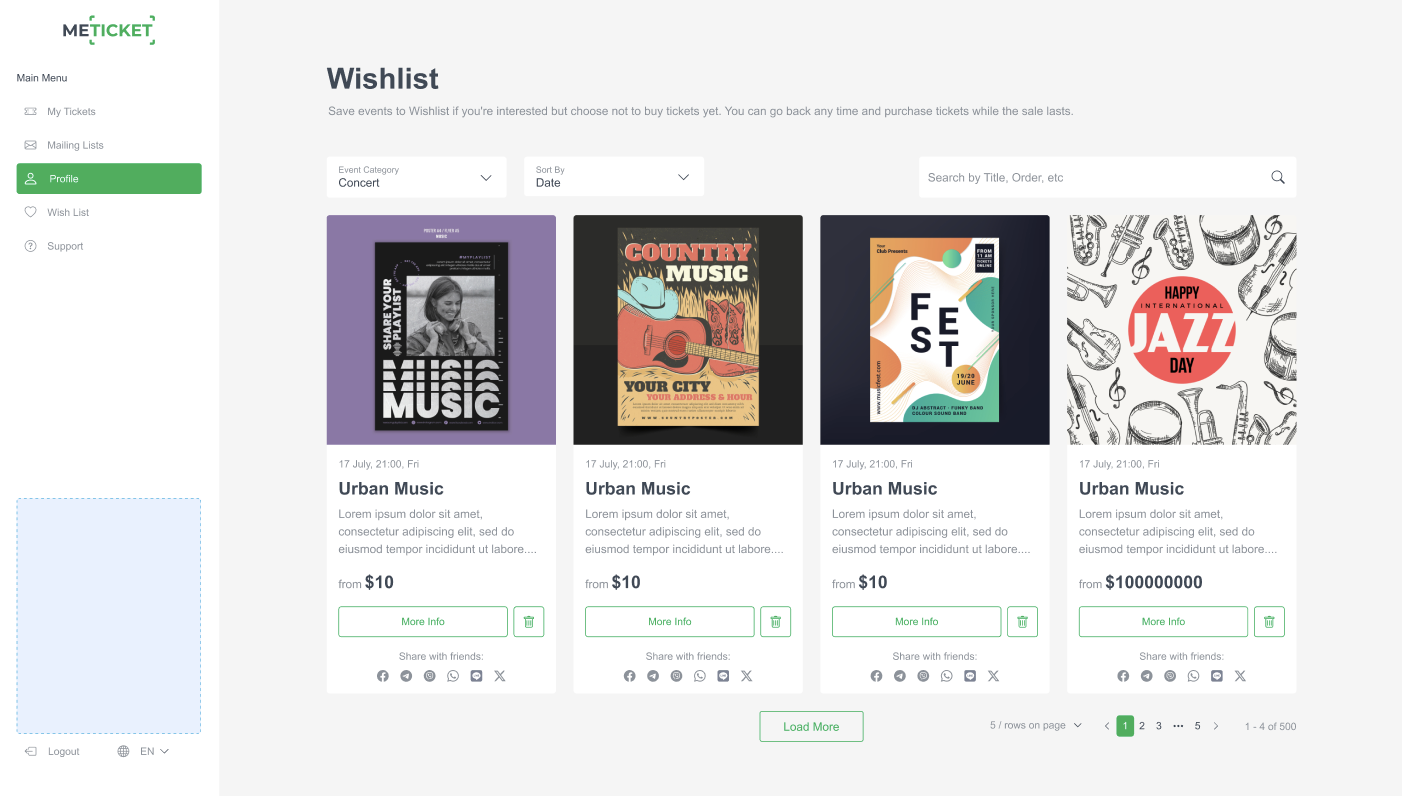
- A grid of saved event cards showing event posters, titles, dates, and pricing details.
- A “More Info” button on each event card.
- A trash/bin icon to remove individual events from your Wishlist.
- Social sharing icons (message, Facebook, Instagram, etc.) to share events with friends.
Whether you’re on a computer or smartphone, the layout is clean, user-friendly, and designed to help you quickly organize the events you care about most
What You Can Do in the Wishlist
Based on the interface shown in the images, here’s what you can do:
1. Filter Events
You can filter saved events by:
- Event Category (e.g., Concert)
- Sort By (e.g., Date)
This helps you organize your saved events when the list gets long.
2. Search for Specific Events
Using the Search bar, you can type a title, order number, or keywords to instantly find a particular event in your saved list.

3. View Event Details at a Glance
Each saved event displays:
- Event poster
- Title (e.g., Urban Music, Brazilian Carnival)
- Date and time
- Short description
- Price (e.g., from $10, Free Entry)
4. Quick Actions for Each Event
You can:
- Click More Info to view full event details
- Share the event with friends via social buttons
- Remove the event from your Wishlist using the trash-bin icon
5. Load More Items
If you have many events saved, you can click Load More to browse additional items perfect for active event-goers.
How the Wishlist works (quick overview)
The Wishlist is designed to be clean and intuitive on both desktop and mobile:
- Save events you like with one click while browsing.
- Filter your saved events by category (like Concerts, Theater, Workshops) and sort by date.
- Use the search box inside Wishlist to find a specific event by title or order reference.
- Each saved event displays the poster, date/time, short description, and starting price plus quick actions like “More info,” share, or remove.
When your Wishlist is empty, ME-Ticket shows a friendly illustration and a big Browse Events button to help you discover new shows.


How to Save, Share, and Buy from Wishlist
- Browse events on ME-Ticket.
- Click the heart or “Save” icon on an event card. It instantly appears in Profile → Wish List.
- Need details? Tap More Info to see the full event page, lineup, and ticket options.
- Ready to buy? Open the saved event and hit Buy Tickets — your saved preference keeps the process fast.
- Want to ask friends? Use built-in social share buttons to send the event link via chat or social media.
Key Benefits of Using the ME-Ticket Wishlist
Benefit
What It Means for You
Easy Event Organization
Keep all your favorite events in one place instead of saving links or screenshots.
Save Before You Buy
Not ready to purchase? Save now, return later. Perfect for budgeting or planning.
Quick Access on Any Device
Whether you're on desktop or mobile, your Wishlist stays synced.
Share Events Easily
Use built-in share buttons to show friends what you’re planning to attend.
Never Lose Track of Events
Even if ticket sales aren’t open yet, your Wishlist keeps events bookmarked until you're ready.
Tips for Getting the Most Out of Your Wishlist
- Save even early announcements — Some events appear before tickets are live; save them to check back later.
- Use filters to organize music, festivals, sports, and other categories.
- Share with friends to plan group outings faster.
- Check regularly dates, prices, or availability may change.

Final Thoughts
The ME-Ticket Wishlist is a simple yet powerful feature that helps ticket buyers stay organized and avoid missing out on exciting events. Whether you're tracking multiple concerts or planning next month’s entertainment schedule, it makes the entire experience smoother and more enjoyable.
Start saving your favorite events today and enjoy a more personalized way to plan your next unforgettable outing.
Frequently Asked Questions about Wishlist on ME-Ticket
Yes! You can save as many events as you want. The Wishlist has no limit, so feel free to bookmark every event that catches your interest.
No, the event will remain visible. However, if tickets are sold out, the event page will clearly show that no more tickets are available.
Yes, you need to be logged in. This ensures that your saved events are stored and synced across desktop and mobile devices.
Notifications depend on your account settings. In many cases, you may receive updates about price changes, ticket availability, or event reminders.
Absolutely. As long as you’re logged into your ME-Ticket account, your Wishlist will sync across all devices.